Skool
- 4.2
- Rating
- 1.00M
- Installs
- Free
- Price

 Analysis by App-foxy
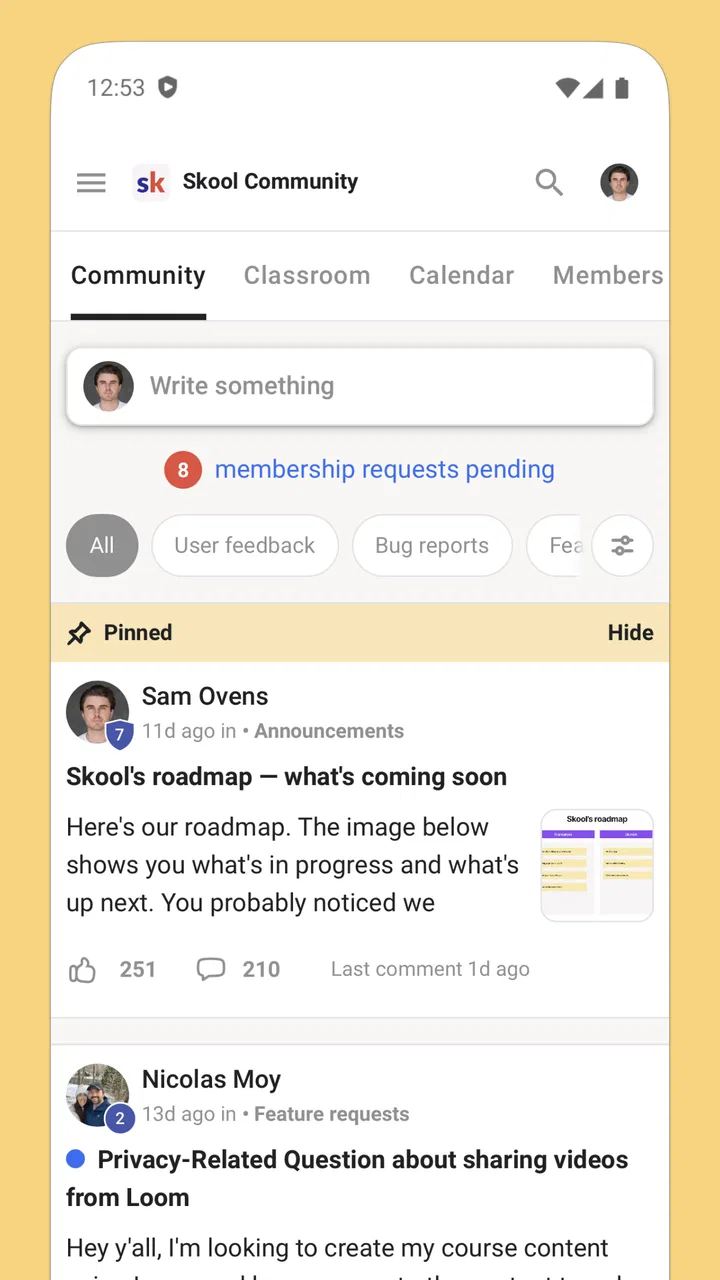
I approached Skool as a practical social app rather than another place to collect notifications. Its purpose is straightforward: it gives members a way to stay connected with their Skool communities while away from a computer. After using it, my impression is that its value depends less on browsing endlessly and more on whether the communities you care about already use Skool well.
That distinction matters. This is not the broad, open-ended social experience I would choose for discovering strangers, following breaking news, or maintaining a casual public profile. It is better understood as a mobile doorway into organized groups. If you belong to a learning community, coaching group, membership space, or another focused network hosted through Skool, the app can make participation feel more immediate. If you do not have a reason to join one of those communities, installing it alone will not create much to do.
How I judged Skool as a mobile community app
My first decision criterion was whether the app reduced the friction between me and the communities I actually wanted to follow. A mobile companion earns its place when checking in takes less effort than opening a browser, remembering where a discussion ended, and searching through unrelated material. Skool is built around that kind of access, so I paid attention to how useful it feels during short moments: a commute, a lunch break, or a few minutes before starting work.
You May Also Like

 Blood Strike: 2.5 Anniversary
Blood Strike’s Loadouts Turn Every Drop Into a Tactical Gamble
A close look at Blood Strike’s custom loadouts: how fast access to signature weapons reshapes its battle royale rhythm, rewards preparation, and narrows the gap between fights.

 Pandora - Music & Podcasts
Pandora’s Music Is Easy to Start, but Harder to Recover
Pandora’s strength is its low-effort path from a seed to a station. Its weak spot is how much confidence it asks you to place in connection, setup, and quiet recovery.

 8 Ball Pool
 Is Built on Rivalries, Rematches, and Routine
A close look at the rivalries, rematches, shared routines, and unanswered safety questions that turn a quick pool match into a persistent mobile community.

 Samsung Music
’s Quiet Strength Is Playing What You Already Own
Its reach comes less from spectacle than from dependable access to a personal library. That simplicity is both the app’s strongest retention engine and its ceiling.

 AccuWeather: Weather Radar
AccuWeather Review: A Quick, Clear Forecast for Everyday Decisions
For everyday plans, the best forecast is the one you can understand quickly. AccuWeather makes rain timing, radar, and local conditions easy to act on, with a few trade-offs.

 Hill Climb Racing
Why Hill Climb Racing Still Turns Crashes Into One More Run
A tiny car, a bumpy hill and one more upgrade: Hill Climb Racing keeps resurfacing because its simple chaos makes every near-miss feel personal.
More From Our News Desk
View All News


The second criterion was focus. Many social platforms reward constant scrolling, while a community app should help me find the conversations, lessons, announcements, or member activity that matter. Skool feels more purposeful when the group itself has a clear rhythm. A well-run community gives the app a reason to be opened; a quiet or poorly organized one makes the same interface feel empty.
I also considered how much commitment the app asks from a new user. The basic download is free, and the app is listed for Teen users. That makes trying it relatively easy, but the real decision is not simply whether the app costs anything to install. It is whether joining a particular community is worth the time, attention, and possible change in routine. The app is a tool for accessing communities, not a substitute for choosing the right one.
Skool comes from skool.com and sits in the social category. It was released on June 1, 2023, and the current version is 1.0.45, with support beginning at iOS or Android version 9. Those details make it accessible to many existing phones, although I would still keep the app updated because community software depends heavily on reliable notifications and account synchronization.
The first few minutes and the role of your community
The most important thing I learned is that the onboarding experience is shaped by membership. This is not an app where the main screen becomes useful through random recommendations. Its usefulness comes from the communities connected to your account. Before downloading, I would first ask myself which group I expect to use and what I want from it. That simple check prevents the common mistake of treating the app like a general-purpose social network.
Once I had a community in mind, the mobile format made more sense. I could think of it as a dedicated access point rather than a separate social identity. That helped me keep expectations realistic: I was not looking for a huge public feed, but for a convenient way to return to a specific environment and see what had changed since my last visit.
For a new member, I recommend taking a few minutes to understand the community’s own structure before trying to follow everything. Look for the areas that contain the conversations you care about, note where important updates appear, and avoid treating every new item as equally urgent. This is one of the less obvious ways to get more from Skool: use the app as a filter for a chosen community, not as an invitation to consume every available update.
That approach is especially helpful for people who join educational or professional groups. A mobile screen can encourage quick reactions, but meaningful progress often comes from returning to a discussion with a question, applying an idea, and then reporting back. I found the app more valuable when I used it to maintain continuity between deeper sessions rather than trying to complete all my community activity from a phone.
Where the focused design works best
Skool’s strongest quality is its sense of purpose when the surrounding community is active and well managed. Instead of mixing contacts, entertainment, advertisements, and unrelated public posts into one stream, the app points me toward a defined group. That makes it easier to remember why I opened it and what kind of interaction is useful.
A realistic everyday scenario would be a member who checks a community during a short break at work. They might read a new discussion, respond to a question from another member, and make a note to return later for a longer contribution. A general social network could offer the same basic action, but it would also compete for attention with unrelated posts. Skool’s advantage is that the context is already narrowed.
I also see value for people who are part of several structured communities but do not want to manage each one through a different communication channel. A single mobile entry point can make it easier to keep community participation separate from personal messaging. The trade-off is that the quality of that experience depends on how clearly each community is organized. The app cannot repair a group that posts without structure or leaves questions unanswered.
Another useful habit is to separate “checking in” from “doing the work.” I might use the app to see whether a discussion needs my response, then move to a larger screen or another tool when I need to write carefully, study, or organize notes. This prevents the phone version from becoming a cramped replacement for every other part of my workflow.
That is where Skool wins against the usual alternatives in the social category. Public networks are better for broad discovery and casual reach. Messaging apps are often better for fast one-to-one exchanges or small private chats. Generic collaboration tools may be stronger when a team needs document handling, project tracking, or workplace administration. Skool is more appealing when the main goal is staying connected to a defined community with a shared purpose.
Practical habits that improve the experience
My first tip is to decide what “staying connected” means for you before enabling the app as part of your routine. If you want to answer questions, follow announcements, or keep pace with a learning group, set a simple checking pattern that fits your day. If you open the app whenever you are bored, it can become another source of low-value scrolling, even though the community focus is narrower than a public feed.
My second tip is to write replies that add context instead of responding to everything with a quick reaction. In a focused community, a useful question or a short progress update can be more valuable than frequent activity. I would rather contribute once with a clear point than create a long trail of shallow responses that I later need to revisit.
My third tip is to treat community choice as part of the app review. Two people can install the same application and have completely different experiences because their groups differ in activity, moderation, and clarity. Before committing time, I would look at whether the community’s discussions match my goals, whether members receive useful responses, and whether the pace feels manageable. The app is the doorway, but the community is the destination.
A fourth insight is about switching between mobile and desktop use. The phone is convenient for awareness and quick participation, but it should not automatically become the place where every task happens. If I need to compare several posts, draft a detailed answer, or work through a lesson, a larger screen may be more comfortable. Using Skool selectively on mobile gives it a clear role instead of forcing it to compete with tools designed for longer work.
Where another type of app may be the better choice
I would not recommend Skool as the first choice for someone who wants a large public audience. If your priority is discovering trending content, building a visible personal feed, or reaching people outside a specific membership group, a mainstream social network is likely to feel more rewarding. Skool’s focused nature is a strength for community participation, but it also means less value for open-ended browsing.
It may also be the wrong fit for a person who mainly needs direct communication. If your daily interactions are short messages, calls, or quick file exchanges with a small group, a dedicated messaging service may feel faster and more natural. Skool makes more sense when the relationship is connected to a shared community rather than a simple conversation.
Likewise, I would choose a specialized project or learning tool when the task requires detailed planning, formal assignments, advanced document workflows, or deep personal organization. Skool can keep me connected to the people around a goal, but connection is not the same as a complete productivity system. Expecting it to replace every tool in a course, business, or personal workflow would create unnecessary frustration.
There is also a social trade-off. A focused group can make participation feel more relevant, but it can feel limiting if the community is inactive or if you prefer constant variety. Before deciding that the app is not useful, I would distinguish between a problem with the application and a problem with the group I joined. However, if several communities I care about are quiet, the app may simply not justify space in my daily routine.
What the numbers suggest about adoption
Skool has passed one million installs, carries a 4.0 average from around 4.8 thousand ratings, and has about 480 written reviews. I read that combination as evidence of a recognizable product with a substantial user base, but not as a reason to assume it will suit everyone. A rating in that range usually makes me look beyond popularity and ask whether the app matches my specific use case.
The free price is helpful for testing the mobile experience without an upfront app purchase. Still, free installation should not be confused with a free community experience in every possible sense. The practical question is whether access to the community you want involves its own arrangement. I would make that decision based on the group’s value, not on the download price alone.
The Teen content rating is another useful signal for households and younger users, but I would still judge each community on its own tone and purpose. A platform-level age label cannot tell me whether a particular group is suitable for a specific person. Parents and users should consider the nature of the community they intend to join, not just the store category.
The real cost of changing your routine
Switching to Skool is technically simple if the communities that matter to you already use it. The larger cost is behavioral. You may need to remember another place for discussions, adjust how often you check updates, and decide which conversations deserve a response. That cost is reasonable when the app replaces scattered community activity with one focused destination.
The switch is less attractive when your current tools already handle the job well. If your group is comfortable with an existing messenger, forum, or collaboration platform and nobody is struggling to find information, moving merely because Skool is available could create duplication. I would avoid maintaining the same conversation across multiple services unless there is a clear reason to separate announcements, discussion, and private messages.
For someone joining a new community, I would give the app a fair trial based on participation rather than installation. Spend enough time to see whether the group answers questions, shares useful material, and gives members a reason to return. If the only activity is passive reading with no clear benefit, the issue may be the community’s value rather than the mobile interface.
One practical way to control the cost is to define a small purpose for the first week: follow the most relevant discussions, contribute one useful response, and identify where important updates appear. This creates a concrete basis for deciding whether Skool deserves regular attention. It also avoids the vague feeling that you are “supposed” to use a new social app without knowing what success looks like.
My recommendation for different kinds of users
I recommend Skool to people who already belong to a Skool-based community and want a straightforward mobile way to remain involved. It is especially suitable for members who value focused discussion over public discovery and who can benefit from checking in between longer sessions on a computer. The app’s free availability and broad operating-system support make trying it easy for many users.
I would recommend it more cautiously to community leaders or organizers. The app can help members stay connected, but it does not remove the need for clear communication, thoughtful moderation, and a useful rhythm of activity. If the group has no plan for helping members find relevant conversations, a mobile app will not solve that underlying problem.
I would skip it if I wanted an all-purpose social network, a private messenger, or a full project-management workspace. Those needs point toward different categories of alternatives, each built around a different kind of interaction. Skool is at its best when the question is not “What is happening everywhere?” but “What is happening in the community I joined, and how can I take part?”
Overall, I see Skool as a focused companion rather than a universal social destination. Its success depends on the quality and activity of the communities behind it, but that is also what gives it a clear identity. My recommendation is simple: install it when a community you genuinely value lives there, and skip it when you are only looking for another general-purpose feed.
That is an honest reason to use it. The app does not need to replace every social or productivity tool to be worthwhile. It only needs to make returning to the right community easier, more consistent, and less distracting than the alternatives you are currently using.
FAQs for Skool
01What is Skool and how does it work?
Skool is an interactive learning platform designed to enhance the educational experience for students, teachers, and parents. It offers features like real-time collaboration, assignment tracking, and educational resources. Users can join virtual classrooms, participate in discussions, and access a wide range of learning materials tailored to various subjects and grade levels.
02Is Skool available on both Android and iOS devices?
Yes, Skool is available for download on both Android and iOS platforms. The app can be found on the Google Play Store for Android devices and the Apple App Store for iOS devices. This cross-platform availability ensures that users can access their educational content seamlessly on any device they prefer.
03What age group is Skool suitable for?
Skool is designed to cater to a broad range of educational needs, making it suitable for students from elementary school through high school. The app offers age-appropriate content and tools to ensure that users at different educational levels can benefit from its features, fostering an engaging learning environment for all ages.
04Are there any subscription fees or in-app purchases in Skool?
Skool offers a variety of subscription plans that cater to different user needs. While some basic features are available for free, premium features and additional content might require a subscription or in-app purchases. These options allow users to customize their experience based on their educational requirements and budget.
05How does Skool ensure the safety and privacy of its users?
Skool prioritizes user safety and privacy by implementing robust security measures. The app complies with industry-standard data protection regulations and provides controls for parents and educators to monitor and manage student interactions. Skool ensures that all personal data is encrypted and accessible only to authorized users, maintaining a safe learning environment.
Pros
- User-friendly interface enhances navigation.
- Comprehensive educational content available.
- Offline access to resources is supported.
- Engaging interactive features for students.
- Regular updates with new learning materials.
Cons
- Limited language options currently available.
- Some features require a stable internet.
- Occasional login issues reported by users.
- Advertisements can be slightly intrusive.
- Customer support response time can vary.

Skool
Gallery